Imports
Import Lighter and its subaccounts
Fillnovo imports Lighter USDC perpetual executions using a public address. It can discover subaccounts and accepts only a read-only token starting with ro: when authenticated access is needed.
- Connect step by step
- Common errors and fixes
- Check the results
- Prepare the address and optional token
- Understand incomplete history and results
- Connector coverage and limits
- Frequently asked questions
Connect step by step
Prepare access on the platform:
- Open Accounts & imports → Add an account → Wallet and select Lighter. Automatic connections require Pro.
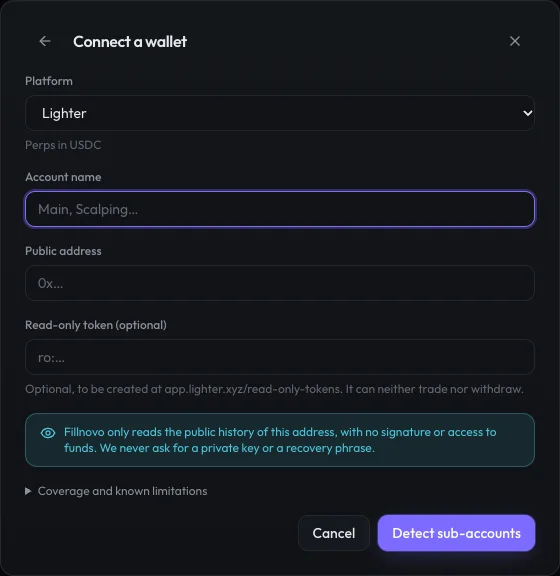
- Name the account, paste the public L1 address and, if needed, the ro: token. Never send the token to support.
- Click Detect subaccounts, select the accounts to track, then connect the selected accounts. Check synchronization and its warnings afterwards.
Common errors and fixes
- Rejected or expired token: replace it with a new ro: token. Other key types are not accepted.
- No account or missing subaccount: check the L1 address and run discovery again. An account holding only spot trades produces no imported trades.
- Interrupted history or rate limit: allow synchronization to resume. Then compare the history boundaries; successful access does not prove older entries are available.
Check the results
Verify imported executions, then net P&L and fees. The funding guide applies to perpetual contracts: do not add this cost to stocks or spot trades where it does not apply.
- How to verify a trade import
- Calculate a trade’s gross and net P&L
- Perpetual futures funding: how does it affect P&L?
No real trading history reconciled against a statement is published for this connector yet. Accepted API credentials or an empty history do not validate trade calculations.
Prepare the address and optional token
Use the public L1 address associated with the Lighter account. Leave the token empty when public access works. If history requires authentication, create a token at app.lighter.xyz/read-only-tokens and paste it only into the designated field. Do not use a trading API key or private key.
Understand incomplete history and results
Public access has been observed to stop at 3,000 rows per account, including spot; spot is then excluded from the import. Whether a token removes this limit has not been verified. Funding is not imported. Nonzero fee rates are not converted into amounts because their units are unconfirmed, and affected trades remain flagged for review. Balances and transfers are excluded; a missing earlier entry can leave P&L unknown.
Lighter · Current coverage
Perps in USDC · Connection available — verify your history
- Without a token, the source returns at most 3,000 rows per account: older history can be completed with a file.
- Fees not imported: the source gives rates whose unit is not documented. Net P&L excludes them, and the trade is flagged.
- Positions hidden by the source can leave an instrument incomplete for a long time.
- Funding not imported: its direction is not established by the source.
- Deposits, withdrawals, positions and account value are not read.
These limits come from the same catalogue as the connection form.
Frequently asked questions
Does Lighter P&L include funding?
No. The connector does not import funding. Reconcile fills, fees and funding payments separately against your Lighter statement.
Sources and documentation
Platform documentation describes their APIs. Fillnovo coverage remains as stated in this guide and the catalogue.