Imports
Import Hyperliquid with a public address
Fillnovo reads Hyperliquid executions from a public address without a signature or private key. The connector covers USDC perpetuals, spot and HIP-3; synchronization is periodic, not real time.
- Connect step by step
- Common errors and fixes
- Check the results
- Choose the right address
- Check history and costs
- Connector coverage and limits
- Frequently asked questions
Connect step by step
Prepare access on the platform:
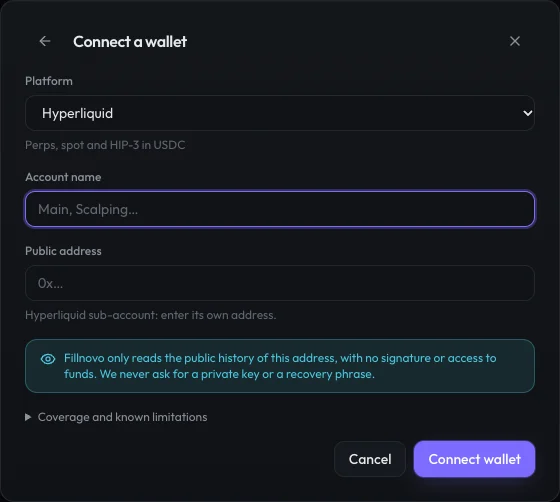
- Open Accounts & imports → Add an account → Wallet and select Hyperliquid. Automatic connections require Pro.
- Name the account and paste its public address: 0x followed by 40 hexadecimal characters. No secret or signature is required.
- Click Connect wallet. Wait for the first synchronization, then check the period and warnings in Accounts & imports.
Common errors and fixes
- Address rejected: copy only the public address. Never enter a private key or recovery phrase.
- Empty history: check the account or subaccount address; an API agent address does not identify its trading history.
- Rate limit or unavailable funding: wait for the next synchronization. Executions already retrieved are retained if funding encounters a temporary error.
Check the results
Verify imported executions, then net P&L and fees. The funding guide applies to perpetual contracts: do not add this cost to stocks or spot trades where it does not apply.
- How to verify a trade import
- Calculate a trade’s gross and net P&L
- Perpetual futures funding: how does it affect P&L?
No real trading history reconciled against a statement is published for this connector yet. Accepted API credentials or an empty history do not validate trade calculations.
Choose the right address
Copy the public address of the account holding the trades. For a subaccount, use its own address rather than the main account or an API agent address. A correctly formatted address can be accepted even when it has no history.
Check history and costs
The connector is limited to the latest 10,000 executions. Markets starting with # and zero-price settlements are excluded and reported. Fees are read from executions; funding starts at the first known fill. Balances and transfers are not imported. Add older history through a file and reconcile fees in their original currency.
Hyperliquid · Current coverage
Perps, spot and HIP-3 in USDC · Connection available — verify your history
- Public read by address: no key, no signature.
- The source only provides the 10,000 most recent fills: older history can be completed with a file.
- “#” markets and zero-price settlements are excluded from the journal and flagged.
- Funding picked up from the first known fill.
- Deposits, withdrawals, positions and account value are not read.
These limits come from the same catalogue as the connection form.
Frequently asked questions
Do I need to provide my private key?
No. The connection uses only the public account or subaccount address. Never enter a private key or recovery phrase.
Sources and documentation
Platform documentation describes their APIs. Fillnovo coverage remains as stated in this guide and the catalogue.